This is a simplified makefile I made out of the gputools package for generating dlls for R. More details can be found in the source code of this package placed at
http://cran.r-project.org/web/packages/gputools/index.html
# directories
CUDA_HOME = /usr/local/cuda
R_HOME = /usr/lib/R
# compiler, objects, targets, etc.
CC = $(CUDA_HOME)/bin/nvcc -gencode arch=compute_13,code=sm_13
EXT = cu
OBJS = rinterface.o correlation.o cuseful.o
TARGET = gputools.so
# compiler/preprocessor options
INCS = -I$(CUDA_HOME)/include
PARAMS = -Xcompiler "-I$(R_HOME)/include `"$(R_HOME)/bin/R" CMD config CPICFLAGS`"
# linker options
LD_PARAMS = -Xlinker "-L$(R_HOME)/lib -lR"
LIBS = -L$(CUDA_HOME)/lib -lcufft -lcublas -lcuda
# make rules
$(TARGET): $(OBJS)
$(CC) -shared $(LD_PARAMS) $(LIBS) $(OBJS) -o $@
$(OBJS): %.o: %.$(EXT)
$(CC) -c $(INCS) $(PARAMS) $(SRCS) $^ -o $@
clean:
rm -f *.o *.linkinfo *~
Terms and concepts of probability
# An experiment is any procedure that can be repeated any number of times, and has a well-defined set of outcomes. (In order to be interesting from a statistical perspective, the result of the procedure is generally not known in advance.)
# An sample outcome (often denoted s) is a member of the set of outcomes of an experiment.
# The sample space (often denoted S) is the complete set of all possible sample outcomes of an experiment.
# An event is any set of sample outcomes. When the outcome of an experiment is a member of this set, the event is said to occur.
# Two events are independent if the occurance of one of the events is not related to the occurance of the other. For example, if we flip a fair coin twice, then the event ``first flip is heads'' is independant of the event ``second flip is heads''. However, the events ``first flip is heads'' and ``first flip is tails'' are not independent, because the occurance of one of these events depends on whether the other has occured. In this case, the correspondance is absolute- but this is not always the case.
# A trial is the actual ``execution'' of an experiment. For example, the procedure of tossing a coin and observing whether the result is heads or tails is an experiment, but the act of actually flipping the coin is a trial.
# A population is the set of all unique trials. This set may be infinite. For example, the population of all coin tosses is infinite, because we can perform as many unique trials as we like by flipping the coin repeatedly. In other situations, the population may be finite- for example, if our experiment is to ask a person enrolled in S-Q whether their last name contains the letter 'e', then the set of unique trials is the set consisting of one trial for each person enrolled in the course.
# A sample is a set of trials. A random sample is a set of trials selected at random from the population.
(from Daniel Ellard, http://www.eecs.harvard.edu/~ellard/Courses/index.html)
# An sample outcome (often denoted s) is a member of the set of outcomes of an experiment.
# The sample space (often denoted S) is the complete set of all possible sample outcomes of an experiment.
# An event is any set of sample outcomes. When the outcome of an experiment is a member of this set, the event is said to occur.
# Two events are independent if the occurance of one of the events is not related to the occurance of the other. For example, if we flip a fair coin twice, then the event ``first flip is heads'' is independant of the event ``second flip is heads''. However, the events ``first flip is heads'' and ``first flip is tails'' are not independent, because the occurance of one of these events depends on whether the other has occured. In this case, the correspondance is absolute- but this is not always the case.
# A trial is the actual ``execution'' of an experiment. For example, the procedure of tossing a coin and observing whether the result is heads or tails is an experiment, but the act of actually flipping the coin is a trial.
# A population is the set of all unique trials. This set may be infinite. For example, the population of all coin tosses is infinite, because we can perform as many unique trials as we like by flipping the coin repeatedly. In other situations, the population may be finite- for example, if our experiment is to ask a person enrolled in S-Q whether their last name contains the letter 'e', then the set of unique trials is the set consisting of one trial for each person enrolled in the course.
# A sample is a set of trials. A random sample is a set of trials selected at random from the population.
(from Daniel Ellard, http://www.eecs.harvard.edu/~ellard/Courses/index.html)
Windows XP Security Update KB951748
Be very aware that Windows XP Security Update KB951748 can freeze wireless connection on the laptop with ZoneAlarm. I had this problem for about half a month and was able to solve it only from removing all recent security updates including KB951748. I guess it is not that late to turn off the annoying windows automatic updates now.
Parallel computing with CUDA.net
Parallel computing of Monte Carlo simulation can easily achieve 40 to 160 speedup with CUDA.net and NVidia Tesla C1060 GPU card. Here is my setup:
1. Machine: Intel® Core™2 Quad CPU Q9450 @ 2.66 GHz 2.66GHz, 3.00 GB of RAM

2. GPU card: NVIDIA® Tesla™ C1060

3. Compiler: Microsoft Visual Studio Team System 2008

4. GPU library: GASS CUDA.net

5. Program: Distribution of Correlated Random Variables

1. Machine: Intel® Core™2 Quad CPU Q9450 @ 2.66 GHz 2.66GHz, 3.00 GB of RAM

2. GPU card: NVIDIA® Tesla™ C1060

3. Compiler: Microsoft Visual Studio Team System 2008

4. GPU library: GASS CUDA.net

5. Program: Distribution of Correlated Random Variables

Create Repository with Subversion, Ankhsvn, and Visual Studio 2008
1. Install Subversion
I used the certified version from Collab.Net. I removed the Apache option during installation for I only want to share projects on local network. The repository directory required by installation is used as the parent folder for a number of project repositories.
Next, I created a temporary folder called "temp" under that parent repository directory and then sub-folders "branches", "tags", and "trunck" under "temp".
Next, in the DOD command windows, I CD into the parent repository folder and type "svnadmin create --fs-type fsfs myproject"to create a project repository called "myproject". I also modified "svnserve.conf" and "passwd" (find how to online) under "myproject" to accommodate authentication.
Further, I started subversion server using command "net start CSVNsvnserve" and imported the project directory layout from "temp" into "myproject" using "svn import -m "initial project layout" svn://localhost/myproject/". The import asks for the Windows User and Password and then the project repository User and Password for validation.
2. Install AnkhSvn
AnkhSvn is also from Collab.Net. Now, it's time to upload the project files to the myproject repository.
In Visual Studio, I right click "mysolution" and choose to "add solution to subversion" and supplied the svn url as "svn://localhost/myproject/trunk". This will create another folder called "mysolution" under "trunk" (all files get a blue plus icon).
Next, I right click "mysolution" again and choose to "subversion -> add" and put all the solution files to the queue adding to repository (all files get a green plus icon).
Further, I right click "mysolution" again and choose to "subversion -> commit" and then all the solution files will be actually uploaded to the "myproject" repository (all files get a blue tick icon).
3. References:
Ankhsvn Documentation
I used the certified version from Collab.Net. I removed the Apache option during installation for I only want to share projects on local network. The repository directory required by installation is used as the parent folder for a number of project repositories.
Next, I created a temporary folder called "temp" under that parent repository directory and then sub-folders "branches", "tags", and "trunck" under "temp".
Next, in the DOD command windows, I CD into the parent repository folder and type "svnadmin create --fs-type fsfs myproject"to create a project repository called "myproject". I also modified "svnserve.conf" and "passwd" (find how to online) under "myproject" to accommodate authentication.
Further, I started subversion server using command "net start CSVNsvnserve" and imported the project directory layout from "temp" into "myproject" using "svn import -m "initial project layout" svn://localhost/myproject/". The import asks for the Windows User and Password and then the project repository User and Password for validation.
2. Install AnkhSvn
AnkhSvn is also from Collab.Net. Now, it's time to upload the project files to the myproject repository.
In Visual Studio, I right click "mysolution" and choose to "add solution to subversion" and supplied the svn url as "svn://localhost/myproject/trunk". This will create another folder called "mysolution" under "trunk" (all files get a blue plus icon).
Next, I right click "mysolution" again and choose to "subversion -> add" and put all the solution files to the queue adding to repository (all files get a green plus icon).
Further, I right click "mysolution" again and choose to "subversion -> commit" and then all the solution files will be actually uploaded to the "myproject" repository (all files get a blue tick icon).
3. References:
Ankhsvn Documentation
LNK2001: unresolved external symbol _gsl_rng_default
The solution to the error LNK2001: unresolved external symbol _gsl_rng_default from using GSL library with MS Visual Studio is simple. It lies inside the project settings (compiler and linker) used for compiling the GSL library and all the test examples. The error disappears when those settings are applied to the work project. Better to do this by looking at the command line options other than browsing the setting dialogs one after one.
Build files for GSL 1.12 for Microsoft Visual Studio 2008
http://gladman.plushost.co.uk/oldsite/computing/gnu_scientific_library.php
(Note: This build has a bug that is not difficult to find out :-))
Build files for GSL 1.12 for Microsoft Visual Studio 2008
http://gladman.plushost.co.uk/oldsite/computing/gnu_scientific_library.php
(Note: This build has a bug that is not difficult to find out :-))
演唱会
在十七岁的初恋第一次约会, 男孩为了她彻夜排队, 半年的积畜买了门票一对。我唱得她心醉,我唱得她心碎,三年的感情一封信就要收回。她记得月台汽笛声声在催,播我的歌陪着人们流泪,嘿咦嘿嘿,陪着人们流泪。她来听我的演唱会, 在二十五岁恋爱是风光明媚。男朋友背着她送人玫瑰, 她不听电话夜夜听歌不睡。我唱得她心醉,我唱得她心碎,成年人分手后都像无所谓。和朋友一起买醉卡拉ok,唱我的歌陪着画面流泪,嘿咦嘿嘿,陪着流眼泪。我唱得她心醉,我唱得她心碎,在三十三岁真爱那么珍贵。年轻的女孩求她让一让位,让男人决定跟谁远走高飞,嘿咦嘿嘿,谁在远走高飞。我唱得她心醉,我唱得她心碎,她努力不让自己看来很累。岁月在听我们唱无怨无悔,在掌声里唱到自己流泪,嘿咦嘿嘿,唱到自己流泪。她来听我的演唱会,在四十岁后听歌的女人很美。小孩在问她为什么流泪,身边的男人早已渐渐入睡。她静静听着我们的演唱会。
Attach Database to MS SQL Server 2005
1. Make sure the database file is not "read-only".
2. Change the path to the databasefile when operating system error is "system cannot find the file specified".
2. Change the path to the databasefile when operating system error is "system cannot find the file specified".
学习 Screen (Day 2)
Some good materials from
http://www.pixelbeat.org/lkdb/screen.html
Key Action Notes
============================
Ctrl+a c new window
Ctrl+a n next window I bind F12 to this
Ctrl+a p previous window I bind F11 to this
Ctrl+a " select window from list I have window list in the status line
Ctrl+a Ctrl+a previous window viewed
Ctrl+a S split terminal horizontally into regions Ctrl+a c to create new window there
Ctrl+a :resize resize region
Ctrl+a :fit fit screen size to new terminal size Ctrl+a F is the same. Do after resizing xterm
Ctrl+a :remove remove region Ctrl+a X is the same
Ctrl+a tab Move to next region
Ctrl+a d detach screen from terminal Start screen with -r option to reattach
Ctrl+a A set window title
Ctrl+a x lock session Enter user password to unlock
Ctrl+a [ enter scrollback/copy mode Enter to start and end copy region. Ctrl+a ] to leave this mode
Ctrl+a ] paste buffer Supports pasting between windows
Ctrl+a > write paste buffer to file useful for copying between screens
Ctrl+a < read paste buffer from file useful for pasting between screens
Ctrl+a ? show key bindings/command names Note unbound commands only in man page
Ctrl+a : goto screen command prompt up shows last command entered
http://www.pixelbeat.org/lkdb/screen.html
Key Action Notes
============================
Ctrl+a c new window
Ctrl+a n next window I bind F12 to this
Ctrl+a p previous window I bind F11 to this
Ctrl+a " select window from list I have window list in the status line
Ctrl+a Ctrl+a previous window viewed
Ctrl+a S split terminal horizontally into regions Ctrl+a c to create new window there
Ctrl+a :resize resize region
Ctrl+a :fit fit screen size to new terminal size Ctrl+a F is the same. Do after resizing xterm
Ctrl+a :remove remove region Ctrl+a X is the same
Ctrl+a tab Move to next region
Ctrl+a d detach screen from terminal Start screen with -r option to reattach
Ctrl+a A set window title
Ctrl+a x lock session Enter user password to unlock
Ctrl+a [ enter scrollback/copy mode Enter to start and end copy region. Ctrl+a ] to leave this mode
Ctrl+a ] paste buffer Supports pasting between windows
Ctrl+a > write paste buffer to file useful for copying between screens
Ctrl+a < read paste buffer from file useful for pasting between screens
Ctrl+a ? show key bindings/command names Note unbound commands only in man page
Ctrl+a : goto screen command prompt up shows last command entered
PDFLaTeX with EPS and PNG Figures
Take a look at this trick in the post at http://opendevice.blogspot.com/2008/05/eps-files-and-pdflatex.html. The idea is simple. It asks for converting eps figures into pdf figures before compiling the tex file. But it is necessary to remember that only the name, not the .eps extension, of eps figures can be placed in\includegraphics{}; otherwise the eps figures will be converted every time the tex file is compiled.
"There is this odd quirk in LaTeX. The latex executable compiles your .tex files in the old-fashioned DVI format. As such, it accepts by default only .eps (Encapsulated PostScript) images. pdflatex compiles your .tex files in the standard PDF format. For some mysterious quirk, pdflatex accepts raster formats like .png and .jpg , but does not accept .eps!
Sometimes you want the best of both worlds. An undergraduate of my lab, after some googling, found you can force pdflatex to insert .eps files happily:
1)Install texlive-extra packages, or any other package containing the epstopdf utility.
2) Insert the following code in your .tex file:
\newif\ifpdf
\ifx\pdfoutput\undefined
\pdffalse
\else
\pdfoutput=1
\pdftrue
\fi
\ifpdf
\usepackage{graphicx}
\usepackage{epstopdf}
\DeclareGraphicsRule{.eps}{pdf}{.pdf}{`epstopdf #1}
\pdfcompresslevel=9
\else
\usepackage{graphicx}
\fi
3) Compile using pdflatex with the -shell-escape command line option
It seems to work."
"There is this odd quirk in LaTeX. The latex executable compiles your .tex files in the old-fashioned DVI format. As such, it accepts by default only .eps (Encapsulated PostScript) images. pdflatex compiles your .tex files in the standard PDF format. For some mysterious quirk, pdflatex accepts raster formats like .png and .jpg , but does not accept .eps!
Sometimes you want the best of both worlds. An undergraduate of my lab, after some googling, found you can force pdflatex to insert .eps files happily:
1)Install texlive-extra packages, or any other package containing the epstopdf utility.
2) Insert the following code in your .tex file:
\newif\ifpdf
\ifx\pdfoutput\undefined
\pdffalse
\else
\pdfoutput=1
\pdftrue
\fi
\ifpdf
\usepackage{graphicx}
\usepackage{epstopdf}
\DeclareGraphicsRule{.eps}{pdf}{.pdf}{`epstopdf #1}
\pdfcompresslevel=9
\else
\usepackage{graphicx}
\fi
3) Compile using pdflatex with the -shell-escape command line option
It seems to work."
Version Control with VisualSVN Server and TortoiseSVN
Version control is for keeping track all the changes made to the source codes. It is of great convenience for a group of people to work together on the same project as well as a for a student to do his own programming homework. Frankly, I don't know much details of the version control system. It would be crazy for people like me to read its whole manual word by word and to pause frequently to search for all the computer jargon on the internet. So, I managed to learn how to use it quickly for my work.
1. Preparation
You may hear about CVS, an old version control system, but I am using Subversion, which is the new system that becomes more and more popular today.
Subversion manages all the repositories. Repository is the folder where the source codes or project files are stored for version control on the computer. In order to make the repository accessible through internet the Apache HTTP server, which can turn the computer into a web server, need to be installed along with the Subversion system. Since it is not an easy configuration task for them to work happily together I chosen to install VisualSVN Server, which is a package bundle of Subversion, Apache and a management console for Windows platforms.
A client tool is also necessary to communicate with repositories, e.g. download a copy of codes from the repository to local computer ("check out" in jargon) or send modified codes into the repository from local computer ("commit" in jargon). I chosen to use TortoiseSVN, which integrates nicely into the Windows Explorer on the Windows platforms.
2. New Repository Creation
After installing both VisualSVN Server and TortoiseSVN it is then the time to create a repository with an initial copy of your codes. You can read through the tutorial of "Practical guide to subversion on Windows with tortoiseSVN" or follow my simplified steps for doing that.
(1) Open VisualSVN, right click "repositories" in the left frame, choose "create New Repository ..." and uncheck the box of "Create default structure (trunk, branches, tags)".
(2) On your computer, create a folder "tmp", a folder "new" inside "tmp", and three folders named "trunk", "branches", and "tags" inside "new".
(3) Place your codes into the recently created folder "trunk".
(4) Right click the folder "new", choose "TortoiseSVN" and then "Import", choose the right path for your newly created repository, write in the version control message, e.g. "Initial import", and then click "OK".
Note that (1) has to be done on the server computer while (2), (3), and (4) can be done either locally or remotely.
3. Communication with Repository
Please refer to this short TortoiseSVN Tutorial on how to communicate with repositories. It is simple enough to download old codes from and upload modified codes into repositories. All that can be done with TortoiseSVN functions from right clicking your working folders. It should be aware that renaming, deleting, and adding files of codes should all be done with TortoiseSVN, other than through normal file operations in the Windows Explorer, as explained in the TortoiseSVN Tutorial.
So...happy version control!
1. Preparation
You may hear about CVS, an old version control system, but I am using Subversion, which is the new system that becomes more and more popular today.
Subversion manages all the repositories. Repository is the folder where the source codes or project files are stored for version control on the computer. In order to make the repository accessible through internet the Apache HTTP server, which can turn the computer into a web server, need to be installed along with the Subversion system. Since it is not an easy configuration task for them to work happily together I chosen to install VisualSVN Server, which is a package bundle of Subversion, Apache and a management console for Windows platforms.
A client tool is also necessary to communicate with repositories, e.g. download a copy of codes from the repository to local computer ("check out" in jargon) or send modified codes into the repository from local computer ("commit" in jargon). I chosen to use TortoiseSVN, which integrates nicely into the Windows Explorer on the Windows platforms.
2. New Repository Creation
After installing both VisualSVN Server and TortoiseSVN it is then the time to create a repository with an initial copy of your codes. You can read through the tutorial of "Practical guide to subversion on Windows with tortoiseSVN" or follow my simplified steps for doing that.
(1) Open VisualSVN, right click "repositories" in the left frame, choose "create New Repository ..." and uncheck the box of "Create default structure (trunk, branches, tags)".
(2) On your computer, create a folder "tmp", a folder "new" inside "tmp", and three folders named "trunk", "branches", and "tags" inside "new".
(3) Place your codes into the recently created folder "trunk".
(4) Right click the folder "new", choose "TortoiseSVN" and then "Import", choose the right path for your newly created repository, write in the version control message, e.g. "Initial import", and then click "OK".
Note that (1) has to be done on the server computer while (2), (3), and (4) can be done either locally or remotely.
3. Communication with Repository
Please refer to this short TortoiseSVN Tutorial on how to communicate with repositories. It is simple enough to download old codes from and upload modified codes into repositories. All that can be done with TortoiseSVN functions from right clicking your working folders. It should be aware that renaming, deleting, and adding files of codes should all be done with TortoiseSVN, other than through normal file operations in the Windows Explorer, as explained in the TortoiseSVN Tutorial.
So...happy version control!
Extract Plot Data from Scientific Papers
The way for extracting plot data from scientific papers is simple once the right tools have been utilized. On the internet there exist numerous software for serving this purpose but I prefer to use the free ones and those under GNU General Public License. Specifically, the following three are my favorite:
A. Engauge Digitizer - Digitizing software;
B. The Ipe extensible drawing editor;
C. MS Paint - a little drawing tool on Microsoft Windows.
1. Extract the plot as an image file.
This step is quite easy if the paper is already in the pdf format. Open the pdf, enlarge the plot, make a screen capture, paste the capture into MS Paint, cut the plot area, paste the plot into a new file in MS Paint and then save the plot into an image file. But you need to first scan the paper into an image file if it is only a Xerox photocopy. After that, proceed with the scanned image in the same procedure as those for the pdf file.
2. What if the plot is rotated and has undefined coordinates origin?
This could be a rare case but it did happen to me. Here is an example...
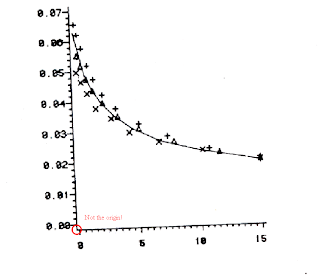 So I used the Ipe drawing editor to define a better coordinate system for the above plot...
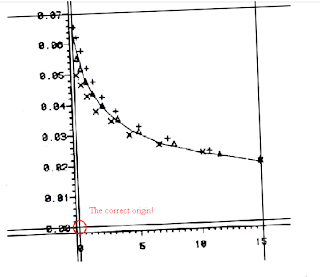 Please refer to the Ipe manual on how to do this.
3. Data extraction
This step is simple enough. Import the plot image into the Engauge Digitizer, define the coordinates with three points (red crosses), set data points (blue crosses) on the curve in the plot, and then extract the data values into a .csv file.
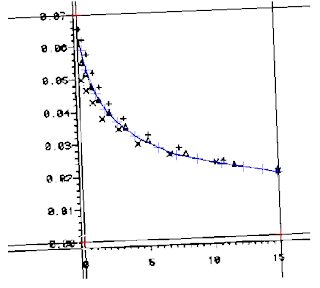
Job done!
A. Engauge Digitizer - Digitizing software;
B. The Ipe extensible drawing editor;
C. MS Paint - a little drawing tool on Microsoft Windows.
1. Extract the plot as an image file.
This step is quite easy if the paper is already in the pdf format. Open the pdf, enlarge the plot, make a screen capture, paste the capture into MS Paint, cut the plot area, paste the plot into a new file in MS Paint and then save the plot into an image file. But you need to first scan the paper into an image file if it is only a Xerox photocopy. After that, proceed with the scanned image in the same procedure as those for the pdf file.
2. What if the plot is rotated and has undefined coordinates origin?
This could be a rare case but it did happen to me. Here is an example...
 So I used the Ipe drawing editor to define a better coordinate system for the above plot...
 Please refer to the Ipe manual on how to do this.
3. Data extraction
This step is simple enough. Import the plot image into the Engauge Digitizer, define the coordinates with three points (red crosses), set data points (blue crosses) on the curve in the plot, and then extract the data values into a .csv file.

Job done!
情难枕
作词:李子恒 作曲:李子恒 演唱:高胜美
如果一切靠缘份 何必痴心爱着一个人
最怕藕断丝连难舍难分 多少黎明又黄昏
就算是不再流伤心泪 还有魂萦梦牵的深夜
那些欲走还留一往情深 都已无从悔恨
早知道 爱会这样伤人 情会如此难枕 当初何必太认真
早明白 梦里不能长久 相思不如回头 如今何必怨离分
除非是当作游戏一场 红尘任他凄凉 谁能断了这情份
除非把真心放在一旁 今生随缘聚散 无怨无悔有几人
如果一切靠缘份 何必痴心爱着一个人
最怕藕断丝连难舍难分 多少黎明又黄昏
就算是不再流伤心泪 还有魂萦梦牵的深夜
那些欲走还留一往情深 都已无从悔恨
早知道 爱会这样伤人 情会如此难枕 当初何必太认真
早明白 梦里不能长久 相思不如回头 如今何必怨离分
除非是当作游戏一场 红尘任他凄凉 谁能断了这情份
除非把真心放在一旁 今生随缘聚散 无怨无悔有几人
Graphics Drawing Tools for LaTeX
bbs.ctex.org
instanton
金牌会员
UID 4630
精华 1
积分 2680
帖子 1924
威望 756
阅读权限 70
注册 2003-8-27
状态 离线
#20 大中小
发表于 2008-5-5 18:52 资料 个人空间 短消息 加为好友
每隔一段时间这样的问题就卷土重来一次,建议版主开一个置顶贴专门解决这个问题。
我个人的推荐意见:
1. 数据图:任选一款CAS系统(付费),或者用gnuplot之类的工具(免费);
2. 流程图:metapost/Asymptote/pgf-tikz;
3. 几何图形:Geogebra/Z.u.L;
4. 费曼图:Jaxodraw;
5. 徒手画示意图:Mayura Draw(付费),或者TpX/Ipe (免费)。
以上推荐的工具除Mayura Draw、TpX外均是跨平台的,无论使用什么系统均有相应的版本。这里特别介绍一下Ipe这个软件。在本坛上曾经有6个帖子提到这款软件,但都没有提到足够高度。实际上单就徒手画而言,Ipe和TpX是大可以拼一下的。特别是最近的6.0pre30版本,我觉得在易用性上可能比TpX还胜一筹,例如在图形中嵌入数学公式就比TpX来得方便许多。
instanton
金牌会员
UID 4630
精华 1
积分 2680
帖子 1924
威望 756
阅读权限 70
注册 2003-8-27
状态 离线
#20 大中小
发表于 2008-5-5 18:52 资料 个人空间 短消息 加为好友
每隔一段时间这样的问题就卷土重来一次,建议版主开一个置顶贴专门解决这个问题。
我个人的推荐意见:
1. 数据图:任选一款CAS系统(付费),或者用gnuplot之类的工具(免费);
2. 流程图:metapost/Asymptote/pgf-tikz;
3. 几何图形:Geogebra/Z.u.L;
4. 费曼图:Jaxodraw;
5. 徒手画示意图:Mayura Draw(付费),或者TpX/Ipe (免费)。
以上推荐的工具除Mayura Draw、TpX外均是跨平台的,无论使用什么系统均有相应的版本。这里特别介绍一下Ipe这个软件。在本坛上曾经有6个帖子提到这款软件,但都没有提到足够高度。实际上单就徒手画而言,Ipe和TpX是大可以拼一下的。特别是最近的6.0pre30版本,我觉得在易用性上可能比TpX还胜一筹,例如在图形中嵌入数学公式就比TpX来得方便许多。
Texmaker and WinEdt with Foxit PDF Reader
This shows how to customize the Foxit PDF Reader as the PDF viewer for Texmaker and WinEdt.
=============================
Texmaker with Foxit PDF Reader
=============================
1. Make a MSDOS batch file called "viewpdf.bat" in its installation folder with the following lines:
taskkill -fi "windowtitle eq %1*"
start %1
REM "C:\Program Files\Foxit Software\Foxit Reader\Foxit Reader.exe" %1
2. If Foxit PDF Reader is not your default PDF viewer, comment out the second the line, uncomment the third line and make sure the path to the Foxit PDF reader is correct in the "viewpdf.bat".
3. Then open Texmaker and go to "options -> Configure Texmaker" and change the "PDF viewer" to "viewpdf.bat" using the program browsing button.
=============================
WinEdt with Foxit PDF Reader
=============================
Reference: alternative PDF viewer in WinEdt 5.3
1. Add to "Startup.edt" located at PATH_TO_WinEDT\Local\ the following two lines
Assign('AcroRead','"C:\Program Files\Foxit Software\Foxit Reader\Foxit Reader.exe"');
Assign("Acro-Title","Foxit Reader");
and make sure the path to Foxit PDF Reader is correct.
2. Open WinEdt and go to "Macros -> Run startup macro" to refresh the PDF viwer.
3. Add to "Acrobat OpenDoc.bat" located at the PATH_TO_WinEDT\Exec\ the following two lines under "PushTagsandRegisters;":
// Foxit?
FindInString(`%$('AcroRead');`,'Foxit',1,2,1000,1);
IfOK(!"Relax;",!"JMP('not_foxit')");
Run('taskkill -fi "windowtitle eq %N.pdf*"','%P',0,1);
Run('%$("AcroRead"); "%P\%N.pdf"');
RestoreRegisters(1111111111);
Exit;
:not_foxit::
4. Add to "Acrobat CloseDoc.bat" located at the PATH_TO_WinEDT\Exec\ the following two lines under "Requires(20040114);":
// Foxit?
FindInString(`%$('AcroRead');`,'Foxit',1,2,1000,1);
IfOK(!"Relax;",!"JMP('not_Foxit')");
LetRegNum(1,0);
:next_Foxit::
LetRegNum(1,%!1+1);>
IfNum(%!1,99,'>',!"JMP('closed_Foxit')");>
SendMessage("%N - Foxit",$0111,$E152);
IfOK(!"JMP('closed_Foxit')",!"Relax;");
SendMessage("- Foxit",$0111,$E151);
JMP('next_Foxit');
:closed_Foxit::
RestoreRegisters(1111111111);
Exit;
:not_Foxit::
=============================
Automate TeXing with WinEdt
=============================
1. Write a macro called "PDFLatexMacro.edt" as below
Do("Exe('%b\Exec\MikTeX\PDFLaTeX.edt');");
IfOK(!"Relax;",!"JMP('not_SUCCESS')");
Do("Exe('%b\Exec\MikTeX\BibTeX.edt');");
IfOK(!"Relax;",!"JMP('not_SUCCESS')");
Do("Exe('%b\Exec\MikTeX\PDFLaTeX.edt');");
IfOK(!"Relax;",!"JMP('not_SUCCESS')");
Do("Exe('%b\Exec\MikTeX\PDFLaTeX.edt');");
IfOK(!"Relax;",!"JMP('not_SUCCESS')");
Do("Exe('%b\Exec\Acrobat OpenDoc.edt');");
:not_SUCCESS:: // jump to end
End;
and a macro called "DVILatexMacro.edt" as below
Do("Exe('%b\Exec\MikTeX\LaTeX.edt');");
IfOK(!"Relax;",!"JMP('not_SUCCESS')");
Do("Exe('%b\Exec\MikTeX\BibTeX.edt');");
IfOK(!"Relax;",!"JMP('not_SUCCESS')");
Do("Exe('%b\Exec\MikTeX\LaTeX.edt');");
IfOK(!"Relax;",!"JMP('not_SUCCESS')");
Do("Exe('%b\Exec\MikTeX\LaTeX.edt');");
IfOK(!"Relax;",!"JMP('not_SUCCESS')");
Do("Run(|%$('DVIView'); -1 ""%P\%N.dvi""|);");
:not_SUCCESS:: // jump to end
End;
and place them under PATH_TO_WinEDT\Macros\Recorder\.
2. Open WinEdt, go to "Options -> Menu Setup", double-click "&Tools", and then right-click the menu items to insert the two macros above.
=============================
Texmaker with Foxit PDF Reader
=============================
1. Make a MSDOS batch file called "viewpdf.bat" in its installation folder with the following lines:
taskkill -fi "windowtitle eq %1*"
start %1
REM "C:\Program Files\Foxit Software\Foxit Reader\Foxit Reader.exe" %1
2. If Foxit PDF Reader is not your default PDF viewer, comment out the second the line, uncomment the third line and make sure the path to the Foxit PDF reader is correct in the "viewpdf.bat".
3. Then open Texmaker and go to "options -> Configure Texmaker" and change the "PDF viewer" to "viewpdf.bat" using the program browsing button.
=============================
WinEdt with Foxit PDF Reader
=============================
Reference: alternative PDF viewer in WinEdt 5.3
1. Add to "Startup.edt" located at PATH_TO_WinEDT\Local\ the following two lines
Assign('AcroRead','"C:\Program Files\Foxit Software\Foxit Reader\Foxit Reader.exe"');
Assign("Acro-Title","Foxit Reader");
and make sure the path to Foxit PDF Reader is correct.
2. Open WinEdt and go to "Macros -> Run startup macro" to refresh the PDF viwer.
3. Add to "Acrobat OpenDoc.bat" located at the PATH_TO_WinEDT\Exec\ the following two lines under "PushTagsandRegisters;":
// Foxit?
FindInString(`%$('AcroRead');`,'Foxit',1,2,1000,1);
IfOK(!"Relax;",!"JMP('not_foxit')");
Run('taskkill -fi "windowtitle eq %N.pdf*"','%P',0,1);
Run('%$("AcroRead"); "%P\%N.pdf"');
RestoreRegisters(1111111111);
Exit;
:not_foxit::
4. Add to "Acrobat CloseDoc.bat" located at the PATH_TO_WinEDT\Exec\ the following two lines under "Requires(20040114);":
// Foxit?
FindInString(`%$('AcroRead');`,'Foxit',1,2,1000,1);
IfOK(!"Relax;",!"JMP('not_Foxit')");
LetRegNum(1,0);
:next_Foxit::
LetRegNum(1,%!1+1);>
IfNum(%!1,99,'>',!"JMP('closed_Foxit')");>
SendMessage("%N - Foxit",$0111,$E152);
IfOK(!"JMP('closed_Foxit')",!"Relax;");
SendMessage("- Foxit",$0111,$E151);
JMP('next_Foxit');
:closed_Foxit::
RestoreRegisters(1111111111);
Exit;
:not_Foxit::
=============================
Automate TeXing with WinEdt
=============================
1. Write a macro called "PDFLatexMacro.edt" as below
Do("Exe('%b\Exec\MikTeX\PDFLaTeX.edt');");
IfOK(!"Relax;",!"JMP('not_SUCCESS')");
Do("Exe('%b\Exec\MikTeX\BibTeX.edt');");
IfOK(!"Relax;",!"JMP('not_SUCCESS')");
Do("Exe('%b\Exec\MikTeX\PDFLaTeX.edt');");
IfOK(!"Relax;",!"JMP('not_SUCCESS')");
Do("Exe('%b\Exec\MikTeX\PDFLaTeX.edt');");
IfOK(!"Relax;",!"JMP('not_SUCCESS')");
Do("Exe('%b\Exec\Acrobat OpenDoc.edt');");
:not_SUCCESS:: // jump to end
End;
and a macro called "DVILatexMacro.edt" as below
Do("Exe('%b\Exec\MikTeX\LaTeX.edt');");
IfOK(!"Relax;",!"JMP('not_SUCCESS')");
Do("Exe('%b\Exec\MikTeX\BibTeX.edt');");
IfOK(!"Relax;",!"JMP('not_SUCCESS')");
Do("Exe('%b\Exec\MikTeX\LaTeX.edt');");
IfOK(!"Relax;",!"JMP('not_SUCCESS')");
Do("Exe('%b\Exec\MikTeX\LaTeX.edt');");
IfOK(!"Relax;",!"JMP('not_SUCCESS')");
Do("Run(|%$('DVIView'); -1 ""%P\%N.dvi""|);");
:not_SUCCESS:: // jump to end
End;
and place them under PATH_TO_WinEDT\Macros\Recorder\.
2. Open WinEdt, go to "Options -> Menu Setup", double-click "&Tools", and then right-click the menu items to insert the two macros above.
My Dual-Boot Notebook
===========================
Thinkpad X61
===========================
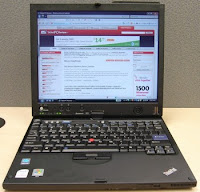
I got my second notebook, Thinkpad X61, a few days ago. With a 12.1 inch screen and no CDROM attached it weighs only 2.2 lbs, which is great for traveling. I chose it because I was really not happy with the weight of my old HP notebook: 7.25 lbs without battery. Before I made the oder I also looked into most popular 9 inch netbooks, such as Asus EEE PC, Acer Aspire One, and Dell E netbook. But they all have some unsolved performance issues with their ATOM cpus and onboard hard drives. I didn't go for Mac Air as well because a notebook that expensive means the same as robbery to me and it also restricts the fun you can find from trying all kinds of software.
As my Thinkpad X61 arrived I found everything to be great except the notorious Windows Vista operating system. My dislike of Vista is not lone but shared by all my friends, by news reports, and even by Bill Gates. So my immediate decision was to reinstall the operating system from scratch for the new notebook. This blog then records all the steps I took for that purpose, most of which were dug out deep from the internet using Google.
I have to mention that Thinkpad X61 has an over-heating issue with its wifi card under the right palm. The issue is most severe with Linux because the system just can't manage the wifi card that well. It is even worse on my notebook since the madwifi wireless driver doesn't have support for power management for the Atheros chip. But the issue is not obvious under Windows XP and becomes zilch after turning off the wifi card in the BIOS.
MACHINE: Thinkpad X61 7675CTO
(Intel Core2 Duo CPU T8100 @ 2.1GHz x 2, 2G RAM, 100G 7200RPM Hard Drive)
===========================
Dual-Boot Systems
===========================
The reinstallation was then planned for a dual-boot system with Windows XP Professional and 64-bit Ubuntu Hardy Heron. The Windows system was setup first and the Ubuntu second. The original hard drive partition and the unseen Windows vista recovery partition were all deleted at installing the Windows system. About 85 GB hard drive space was allocated to the Windows system and was divided into three NTFS primary partitions of 25 GB, 30GB, and 30GB, respectively. The remaining 15 GB was late formatted as a 12 GB ext3 root system and a 2 GB swap space for the Linux system. This allocation seemed too stingy for the Linux system, but I didn't realize this after completed all the work and tried out the new systems for a couple of days. Now I have learned that at least 30 GB hard drive space is necessary for carrying out some basic computational work on the Linux system. What a pity!
(TO BE CONTINUED...)
WINDOWS SYSTEM: Microsoft Windows XP Professional SP3

LINUX SYSTEM: Ubuntu 8.04.1 Hardy Heron
(Kernel 2.6.24-19-generic, Gnome 2.22.3, I386x64)

===========================
Windows XP Setup
===========================
===========================
Ubuntu Hardy Setup
===========================
# powertop:
1. echo 1500 > /proc/sys/vm/dirty_writeback_centisecs
2. sysfutils->ships sysfs.conf which allows to conveniently set sysfs attributes change
cpu frequency scaling to ondemand
# wlan power management:
no power management on madwifi driver for atheros
# chinese
1. language support -> chinese
2. scim setup
# Wpa2
1. /etc/ssl/certs/ca-certificates.crt
2. not done
# LaTex
1. texlive
2. texmaker
# Terminal
1. devils pie
2. setup
# intel compilers
0. fix errors when you try an initial install
1. cce
2. fce
3. mkl
# wireless
remove network-manager
install wicd
remove wicd
intall network-manager
wireless not working
install latest madwifi by replacing its ath_hal with latest hal from people.freebsd.org/~sam
restart and stop wireless roaming
start wireless roaming and works.
# syslog-ng
replace klogd and sysklogd
send network-manager messages to /dev/null with permission change.
# hug log files
solved by deleting network profiles for wpa2
Thinkpad X61
===========================
I got my second notebook, Thinkpad X61, a few days ago. With a 12.1 inch screen and no CDROM attached it weighs only 2.2 lbs, which is great for traveling. I chose it because I was really not happy with the weight of my old HP notebook: 7.25 lbs without battery. Before I made the oder I also looked into most popular 9 inch netbooks, such as Asus EEE PC, Acer Aspire One, and Dell E netbook. But they all have some unsolved performance issues with their ATOM cpus and onboard hard drives. I didn't go for Mac Air as well because a notebook that expensive means the same as robbery to me and it also restricts the fun you can find from trying all kinds of software.
As my Thinkpad X61 arrived I found everything to be great except the notorious Windows Vista operating system. My dislike of Vista is not lone but shared by all my friends, by news reports, and even by Bill Gates. So my immediate decision was to reinstall the operating system from scratch for the new notebook. This blog then records all the steps I took for that purpose, most of which were dug out deep from the internet using Google.
I have to mention that Thinkpad X61 has an over-heating issue with its wifi card under the right palm. The issue is most severe with Linux because the system just can't manage the wifi card that well. It is even worse on my notebook since the madwifi wireless driver doesn't have support for power management for the Atheros chip. But the issue is not obvious under Windows XP and becomes zilch after turning off the wifi card in the BIOS.
MACHINE: Thinkpad X61 7675CTO
(Intel Core2 Duo CPU T8100 @ 2.1GHz x 2, 2G RAM, 100G 7200RPM Hard Drive)

===========================
Dual-Boot Systems
===========================
The reinstallation was then planned for a dual-boot system with Windows XP Professional and 64-bit Ubuntu Hardy Heron. The Windows system was setup first and the Ubuntu second. The original hard drive partition and the unseen Windows vista recovery partition were all deleted at installing the Windows system. About 85 GB hard drive space was allocated to the Windows system and was divided into three NTFS primary partitions of 25 GB, 30GB, and 30GB, respectively. The remaining 15 GB was late formatted as a 12 GB ext3 root system and a 2 GB swap space for the Linux system. This allocation seemed too stingy for the Linux system, but I didn't realize this after completed all the work and tried out the new systems for a couple of days. Now I have learned that at least 30 GB hard drive space is necessary for carrying out some basic computational work on the Linux system. What a pity!
(TO BE CONTINUED...)
WINDOWS SYSTEM: Microsoft Windows XP Professional SP3

LINUX SYSTEM: Ubuntu 8.04.1 Hardy Heron
(Kernel 2.6.24-19-generic, Gnome 2.22.3, I386x64)

===========================
Windows XP Setup
===========================
===========================
Ubuntu Hardy Setup
===========================
# powertop:
1. echo 1500 > /proc/sys/vm/dirty_writeback_centisecs
2. sysfutils->ships sysfs.conf which allows to conveniently set sysfs attributes change
cpu frequency scaling to ondemand
# wlan power management:
no power management on madwifi driver for atheros
# chinese
1. language support -> chinese
2. scim setup
# Wpa2
1. /etc/ssl/certs/ca-certificates.crt
2. not done
# LaTex
1. texlive
2. texmaker
# Terminal
1. devils pie
2. setup
# intel compilers
0. fix errors when you try an initial install
1. cce
2. fce
3. mkl
# wireless
remove network-manager
install wicd
remove wicd
intall network-manager
wireless not working
install latest madwifi by replacing its ath_hal with latest hal from people.freebsd.org/~sam
restart and stop wireless roaming
start wireless roaming and works.
# syslog-ng
replace klogd and sysklogd
send network-manager messages to /dev/null with permission change.
# hug log files
solved by deleting network profiles for wpa2
Bolzano-Weierstrass Property
I used here the proof of the Bolzano-Weierstrass Property from the book "Elementary Real Analysis" by Thomson et al.. Note this theorem is different than the Bolzano-Weierstrass Theorem.
\begin{theorem} A set of real numbers $E$ is closed and bounded if and only if every sequence of points chosen from the set has a subsequence that converges to a point that belongs to $E$. \end{theorem}
\begin{corollary} A set of real numbers $E$ is closed and bounded if and only if every sequence of $E$ has a point of accumulation that belongs to $E$. \end{corollary}
\begin{proof} Suppose that $\E$ is both closed and bounded and let $\{x_n\}$ be a sequence of points chosen from $E$. Since $E$ is bounded this sequence $\{x_n\}$ must be bounded too. We apply the Bolzano-Weierstrass theorem for sequences to obtain a subsequence $\{x_{n_k}\}$ that is both monotonic and convergent. If $x_{n_k}\rightarrow z$ then there is $K$ such that $|x_{n_k}-z|<\epsilon$ for all $k\geq K$ and any positive $\epsilon$ . Since all the points of this subsequence belong to $E$ the neighborhoods of $z$ contain infinite points belong to $E$. So, by definition $z$ is a point of accumulation of $E$. Now we see that $ z\in E$ since $\E$ is closed.
So the Bolzano-Weierstrass Property is really that every sequence of a set of real numbers has a subsequence that converges to a point, or has a point of accumulation, that belongs to this set.
In the opposite direction we suppose that there is a set E which has the Bolzano-Weierstrass property but we don't know in advance if $E$ is closed and bounded. Then E cannot be unbounded. For example, if $E$ is unbounded then there is a sequence of points $\{x_n\}$ of $E$ with $x_n\rightarrow \infty$ or $x_n\rightarrow -\infty$ and no subsequence of that sequence converges, which contradicts the assumption. Also, $E$ must be closed. If $E$ is not closed, there is a point of accumulation $z$ such that $z\ni E$. This means that there is a sequence of points $\{x_n\}$ in $E$ converging to $z$. But any subsequence of $\{x_n\}$ would also converge to $z$ and $z\ni E$, which contradicts the Bolzano-Weierstrass Property assumed for $E$. \end{proof}
References: Bolzano-Weierstrass theorem
~~~
Subscribe to:
Posts (Atom)

